TickTappy Full Review - Elegantly Minimal One-Tap Time Tracking for Individuals
Welcome to our TickTappy review! Let's explore how this beautifully simple one-tap time tracking app transforms the way you track your time.
Why TickTappy Exists
Time tracking shouldn't feel like a chore. Yet for freelancers, developers, and solo entrepreneurs, most time trackers are built for enterprise teams -- mandatory fields, complex categorization, overwhelming dashboards.
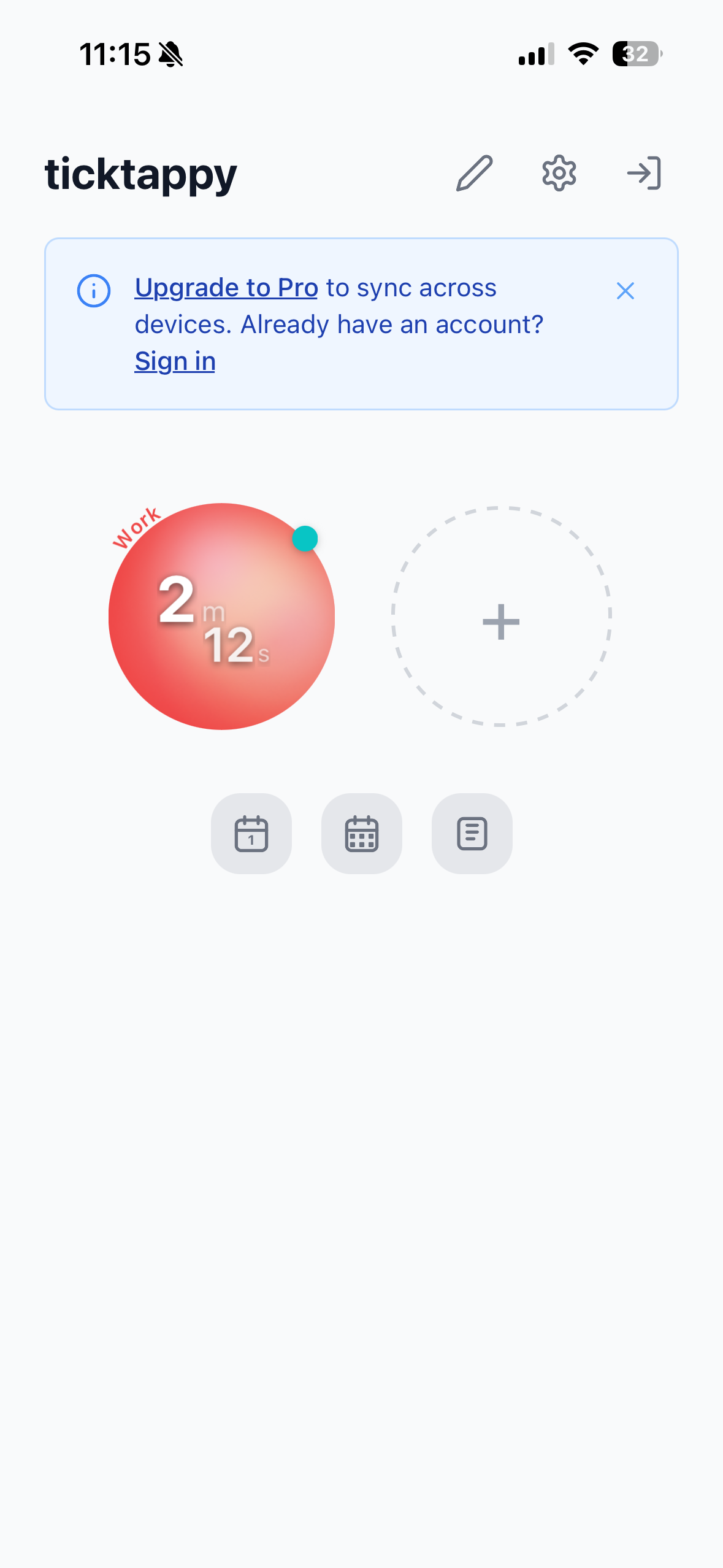
TickTappy takes the opposite approach. This minimalist app is designed for individuals, not teams. One-tap tracking, colorful tags, and clean summaries -- built for people who value simplicity over complexity. The result: time tracking that works in seconds, not minutes.
What makes this compelling is the focus on simplicity and privacy. Built by a solo developer as a privacy-first indie app, TickTappy offers native apps for iPhone, iPad, Mac, Apple Watch, Android, and web -- no ads, no data selling, and none of the overwhelming complexity of enterprise tools like Toggl, Clockify, or Harvest.
The Friction TickTappy Removes
Conventional time tracking frustrates in several ways:
- Overwhelming complexity: Enterprise tools demand project selection, team assignment, detailed descriptions, and mandatory categorization before you can start a timer
- Account requirements: Most apps force sign-up just to track time
- Privacy concerns: Enterprise solutions often sell data or use it for advertising
- Expensive: Monthly fees for features freelancers don't need
- Steep learning curve: Complex interfaces take time to master
- No offline: Web-based tools stop working without internet
TickTappy addresses all of this with a radical commitment to simplicity -- friction-free tracking without overhead or privacy worries.
Core Features
One-Tap Time Tracking
The centerpiece of TickTappy's experience.
How It Works
Two simple steps:
- Create colorful tags: Set up unlimited project tags with your preferred colors
- Tap to start/stop: Tap a tag circle to begin, tap again to end
No dropdown menus, no mandatory forms, no forced categorization. Just tap and go.
Smart Timer Management
- One timer at a time: Switching tags auto-stops the previous timer (unless pinned)
- Optional pinned background timers: Keep certain timers running while switching others
- Quick time adjustment: Fix mistakes instantly after starting or stopping
- Retroactive start: Begin tracking for past sessions (e.g., "started 30 min ago")
This intelligent automation means never worrying about overlapping timers or forgetting to stop one.
Ideal for: Freelancers, developers, anyone wanting tracking that doesn't interrupt flow.
Cross-Platform Native Apps
True native apps across platforms, not web wrappers.
Platform Coverage
- iPhone & iPad: Fully native iOS apps for touch
- Mac: Native Mac app with keyboard shortcuts and desktop optimization
- Apple Watch: Complete watch app with complications -- timer always one tap away
- Android: Native Android app
- Web: Progressive web app from any browser
Apple Ecosystem Depth
- Home Screen Widgets: Small and Medium with interactive tag circles
- Live Activity: Running timer on Lock Screen and Dynamic Island
- Control Center Widget: Quick access (iOS 18+)
- Apple Watch Complications: Timer always visible on wrist
Native-first means smooth performance, offline capability, and seamless platform integration.
Color-Coded Tag System
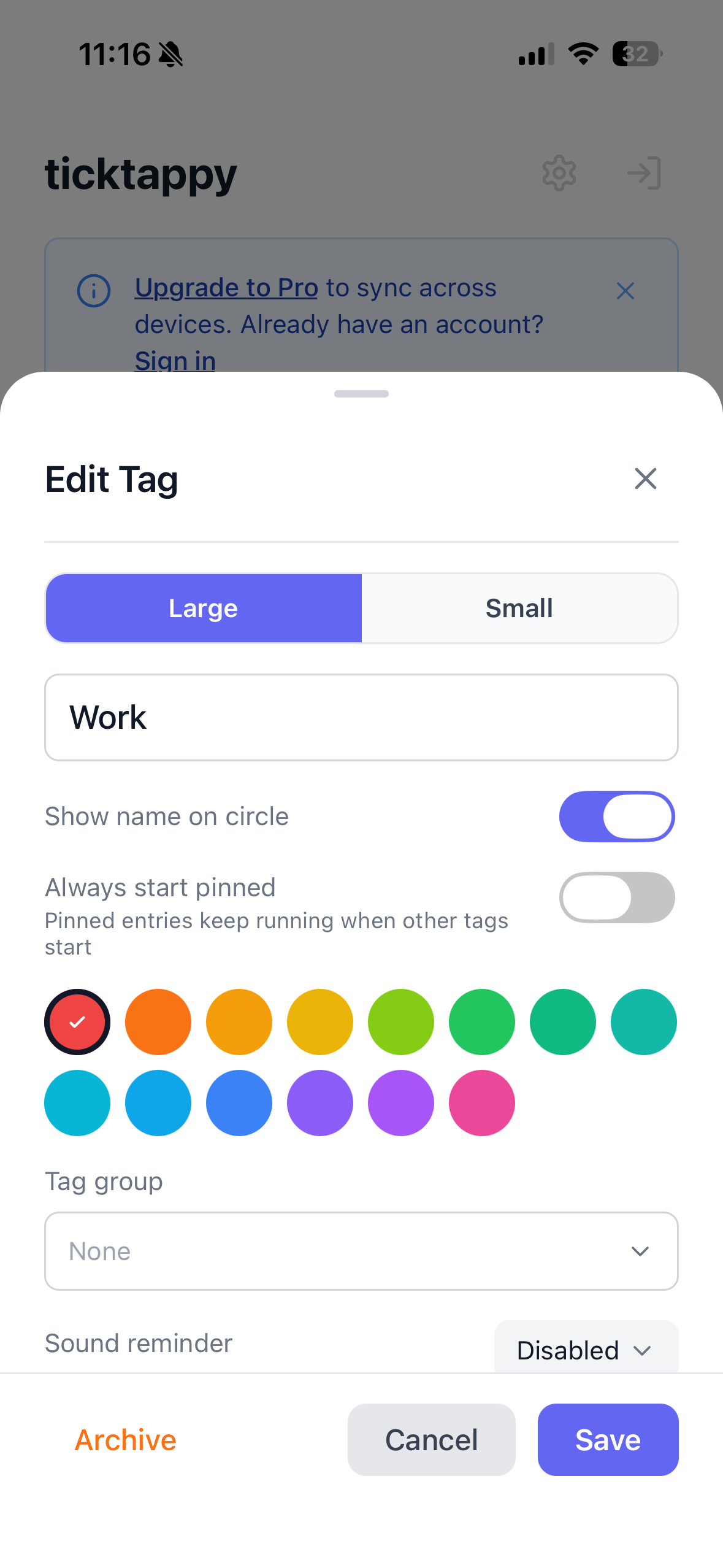
Organize work with unlimited, color-coded tags for visual, intuitive tracking.
Tag Features
- Unlimited tags: As many as needed for projects, clients, or activities
- Color coding: Instant visual recognition
- Tag groups: Logical organization
- Drag & drop reordering: Arrange in your preferred order
- Archive tags: Remove without losing historical data
- Optional sound reminders: Per-tag reminders to stay on track
Visual color coding makes time distribution scannable at a glance.
Clean Summaries
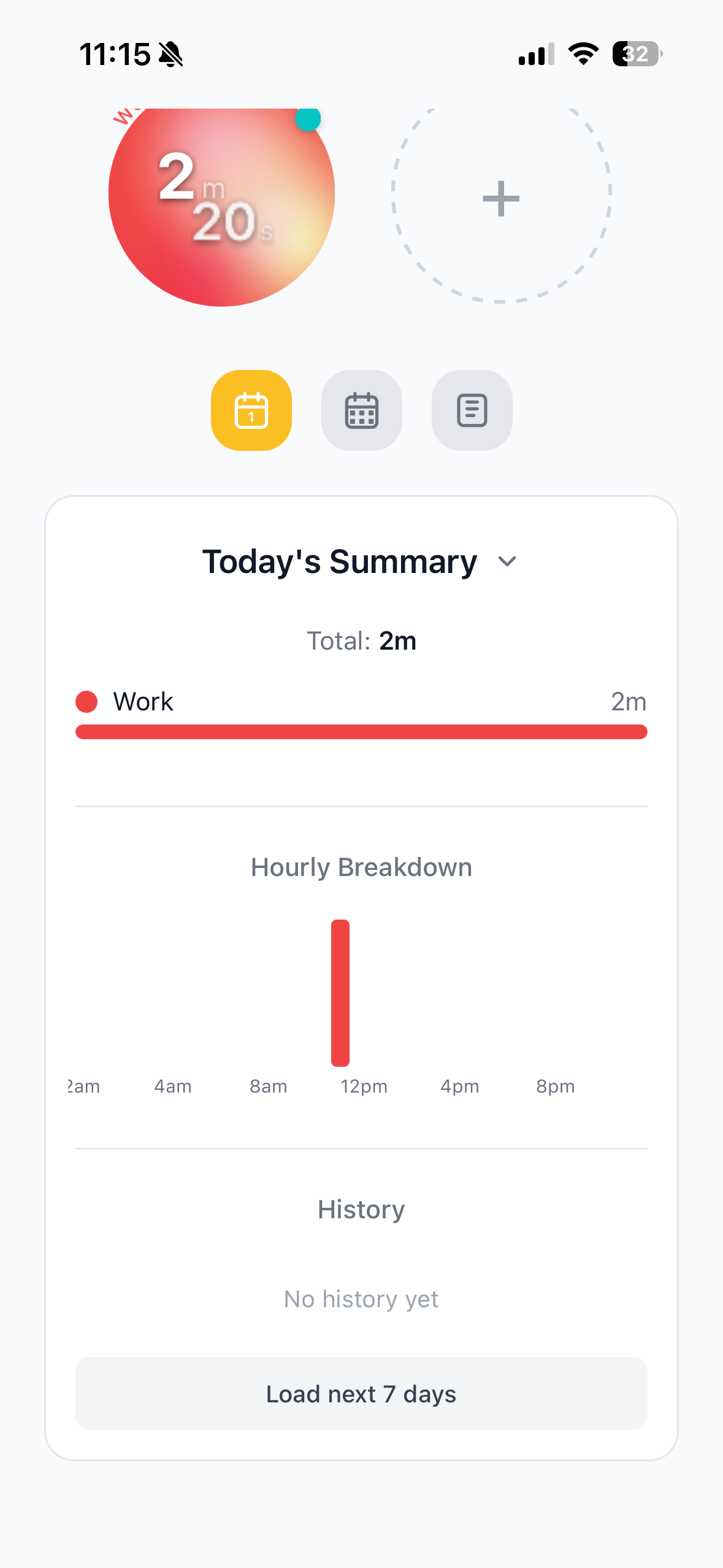
See where time goes with simple, clean views -- no overwhelming dashboards or complex reports.
Views
- Day Summary: Time breakdown by tag with progress bars
- Week Summary: Weekly patterns with bar charts per project
- Time Breakdowns: Clear visual representations
Entry Management
- View, edit, or delete past entries
- Full control over tracked time
Summaries provide insight without overwhelming you with data.
Pricing
Free Tier: Local Tracking
- Completely free, no account required
- One-tap tracking, unlimited color-coded tags
- Day and week summaries
- All platform apps, offline tracking, local storage
Premium Tier: Cross-Device Sync
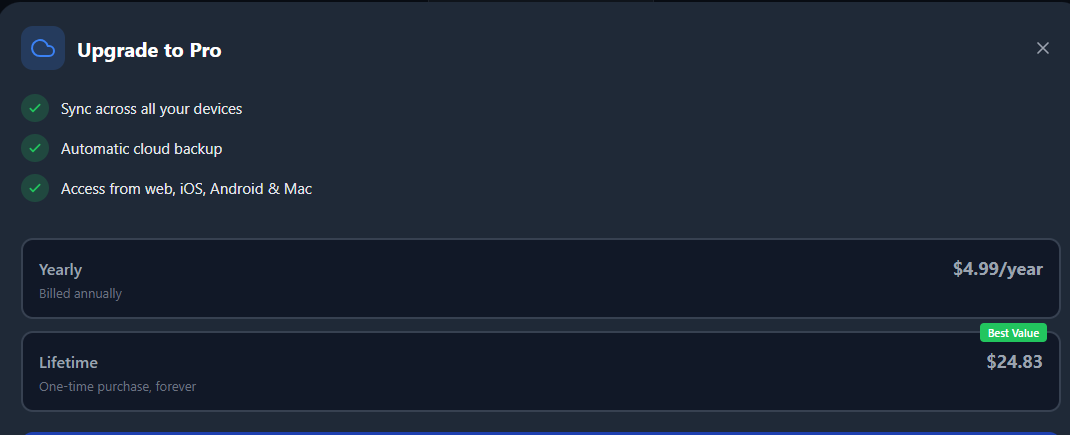
- Premium Yearly: $4.99/year
- Premium Lifetime: $24.83 one-time payment
- Everything in Free plus cloud sync across all devices
At $4.99/year or $24.83 lifetime, Premium sync is incredibly affordable compared to competitors charging $10-20/month. The lifetime option pays for itself in about 1.25 years versus yearly billing.
System Requirements
- Account: Optional -- only needed for Premium sync
- Internet: Required for web app and sync; apps work offline
- Storage: Local on-device for free tier, cloud for Premium
Getting Started
- Download from App Store, Google Play, Mac App Store, or visit ticktappy.com
- Create your first colorful tag
- Tap to start tracking
- Tap again to stop
- View day and week summaries
- Upgrade to Premium (optional) for cross-device sync
Minutes to set up, no account required to begin.
Competitive Differentiation
- True one-tap tracking: No mandatory fields, no forms
- Individual-focused: Built for solo users, not teams
- Privacy-first: No ads, no data selling, indie transparency
- Offline-first: Track anywhere without internet
- Affordable: Premium at $4.99/year or $24.83 lifetime
- Native apps: True native experiences across platforms
- No account required: Start immediately
- Clean summaries: Simple views, not overwhelming dashboards
Comparison
| Feature | TickTappy | Toggl | Clockify |
|---|---|---|---|
| One-Tap Tracking | ✅ Yes | ❌ No | ❌ No |
| Mandatory Fields | ✅ None | ✅ Required | ✅ Required |
| Account Required | ✅ No | ✅ Yes | ✅ Yes |
| Privacy-First | ✅ Yes | ⚠️ Enterprise Focus | ⚠️ Enterprise Focus |
| Offline Support | ✅ Full | ⚠️ Limited | ❌ No |
| Native Apps | ✅ All Platforms | ✅ Mobile + Web | ✅ Web + Mobile |
| Pricing Model | ✅ Free + $4.99/yr or $24.83 lifetime | ✅ Free + Paid | ✅ Free + Paid |
| Clean Summaries | ✅ Yes | ⚠️ Complex | ⚠️ Complex |
| Team Focus | ❌ Individual Only | ✅ Teams First | ✅ Teams First |
Who Uses TickTappy
TickTappy serves individuals aged 22-45 across tech, design, consulting, and education who've grown frustrated with complex time trackers.
Freelancers & Consultants managing 3-5 client projects find Toggl or Harvest overkill for solo work -- they need simpler billable hour tracking.
Software Developers on side projects, open source, or client work use TickTappy to track deep work versus meetings and optimize schedules.
Students building better focus habits rely on TickTappy to track study sessions and understand time distribution.
Solo Entrepreneurs & Indie Hackers juggling multiple projects appreciate managing everything without team-focused tool overhead.
Anyone curious about daily time distribution -- whether tracking work, personal projects, or understanding habits.
The common thread: valuing simplicity. Most have tried and abandoned complex trackers, seeking insight without overhead. While multi-platform, TickTappy is particularly embraced by the Apple ecosystem -- iPhone, iPad, and Mac users wanting a native experience that respects their time.
Final Verdict
After thoroughly exploring TickTappy, this minimalist time tracking app clearly fills a crucial market gap. Unlike enterprise solutions for teams, TickTappy is built for individuals who value simplicity over complexity.
The commitment to the one-tap philosophy is what stands out most. No mandatory fields, no forms, no complexity -- just tap a tag and start. Color-coded tags, clean summaries, and cross-platform native apps create a complete experience that respects your time and attention.
The free tier removes all barriers -- start tracking immediately without an account. Premium sync is remarkably affordable, especially against competitors charging $10-20/month for features freelancers don't need.
This app is particularly valuable for freelancers, developers, students, and anyone who finds enterprise time trackers too complex for solo work.
Review Summary
- Ease of Use: ⭐⭐⭐⭐⭐ (5/5)
- Time to Start Tracking: ⭐⭐⭐⭐⭐ (5/5)
- Simplicity: ⭐⭐⭐⭐⭐ (5/5)
- Cross-Platform Support: ⭐⭐⭐⭐⭐ (5/5)
- Offline Capability: ⭐⭐⭐⭐⭐ (5/5)
- Value for Money: ⭐⭐⭐⭐⭐ (5/5)
- Privacy: ⭐⭐⭐⭐⭐ (5/5)
- Overall Review Score: ⭐⭐⭐⭐⭐ (5/5)
Ready to simplify your time tracking? 👉 Try TickTappy for Free today. Experience one-tap time tracking that just works -- built for people who hate complex time trackers.
Tags
# Review# time tracking app# simple time tracker# minimalist time tracking# freelance time tracker# one-tap time tracking# best simple time tracking app for freelancers# easy time tracker for iPhone and Mac# minimalist alternative to Toggl# time tracking app for people who hate time trackingJam SQL Studio Comprehensive Review - The AI-Native SQL IDE for Every Platform
AIChatOne Deep Dive - The All-in-One AI Browser Extension for Modern Workflows
Follow for new blogs
Subscribe to our blog
Subscribe to Newsletter
Subscribe to our newsletter to get the best products weekly.